Python Intro Part2 DEVOPS ONLINE TRAINING
July 07, 2026 — LiveStream
🛒 Recommended gear on AmazonDisclosure: some links above are affiliate links — if you buy through them I may earn a small commission at no extra cost to you. Thanks for supporting the channel!
As an Amazon Associate I earn from qualifying purchases.
Ready to level up your automation game? This comprehensive guide dives deep into Python Intro Part2, specifically tailored for DevOps online training, equipping you with essential Python scripting skills to tackle real-world infrastructure challenges. We'll explore crucial concepts like control flow, data structures, functions, modules, file I/O, and error handling – all from a practical, DevOps perspective.
Hey junior, grab a chai! Today, we're taking the next big step in our Python journey, focusing on how these core programming constructs become your superpower in the DevOps world. Last time, we got comfy with variables and basic operations. Now, it's time to make our Python scripts smarter, more robust, and genuinely useful for automating infrastructure, managing configurations, and orchestrating deployments. This isn't just about learning Python; it's about learning Python for DevOps, understanding how each concept translates into practical solutions for your daily tasks. This session is crucial for anyone pursuing DevOps online training, bridging the gap between theoretical Python knowledge and hands-on application.
Think about it: as a DevOps engineer, you're constantly dealing with conditional logic ("if this service is down, restart it"), iterating over lists of servers ("deploy this update to all web servers"), processing configuration files ("read this YAML and apply settings"), and ensuring your scripts don't crash at the first sign of trouble. Guess what? Python's got your back for all of that, and today, we're cracking open those powerful tools. Let's make sure your Python Intro Part2 knowledge is rock solid, paving the way for advanced automation.
Mastering Python Control Flow for DevOps Automation
Okay, so you know how to store data in variables. But what if you need your script to make decisions? What if you need it to repeat a task multiple times? That’s where control flow statements come in. They dictate the order in which your code executes, allowing your scripts to respond dynamically to different situations – a core requirement for any effective DevOps automation.
Conditional Execution with if, elif, else
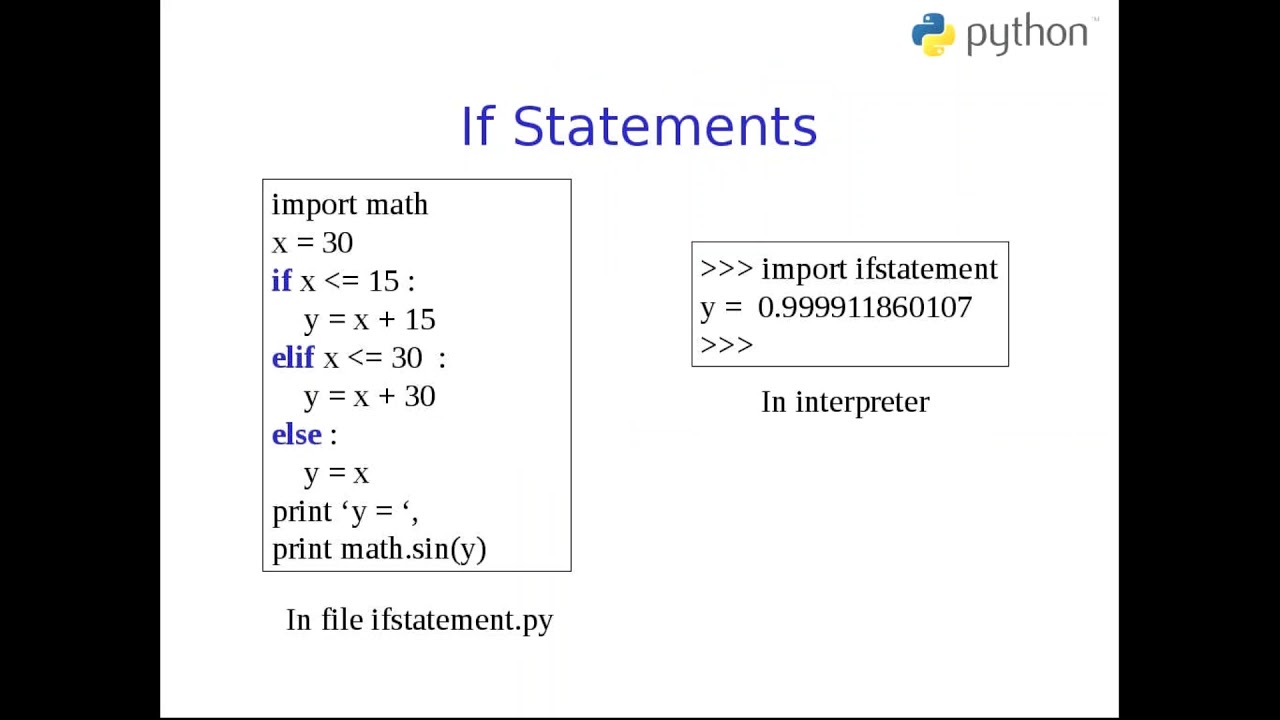
Imagine you're writing a deployment script. You can't just blindly deploy; you need to check if the server is reachable, if the correct environment variables are set, or if the application is already running. This is where if, elif, and else statements shine. They allow your script to execute different blocks of code based on certain conditions.
Let's say you're writing a script to check the status of a service on a remote server. You might want to take different actions based on whether the service is 'running', 'stopped', or 'unknown'.
service_status = "running" # In a real script, this would come from a system command output

if service_status == "running":
    print("Service is healthy. Proceeding with operations.")
    # Add logic to, say, check logs or apply updates
elif service_status == "stopped":
    print("Service is stopped. Attempting to start service...")
    # Add logic to restart the service
elif service_status == "unknown":
    print("Could not determine service status. Manual intervention may be required.")
    # Add alerting logic
else:
    print(f"Unexpected service status: {service_status}")
See how powerful this is? It's not just a linear execution anymore. Your script gains intelligence, making it invaluable for robust monitoring and self-healing systems. In a DevOps context, you'll use this for environment checks, pre-deployment validations, post-deployment health checks, and even in CI/CD pipelines to conditionally execute stages.
Looping Through Tasks with for and while
DevOps often involves repetitive tasks. Think about deploying an application to a cluster of 100 servers, checking the disk usage on every host, or processing multiple log files. Writing separate code for each instance is inefficient and prone to errors. This is where loops become your best friend.
The for Loop: Iterating Over Collections
The for loop is perfect when you need to iterate over a collection of items, like a list of server IPs, a range of numbers, or characters in a string. It’s incredibly versatile for processing inventories or performing actions on multiple targets.
Imagine you have a list of server IPs where you need to perform a specific action, like copying a configuration file:
server_ips = ["192.168.1.101", "192.168.1.102", "192.168.1.103", "192.168.1.104"]
config_file = "app_config.yaml"

print("Starting configuration deployment...")
for ip in server_ips:
    print(f"Deploying {config_file} to {ip}...")
    # In a real scenario, you'd use SSH/Ansible modules here to copy the file
    # For now, let's just simulate the action
    print(f"Successfully deployed to {ip}.")
print("Configuration deployment finished.")
This snippet demonstrates how a for loop simplifies tasks that need to be performed on multiple targets. Whether it's iterating through a list of database connections to test, or processing each line of a giant log file, the for loop is your go-to. It makes your code cleaner, more readable, and significantly more scalable. You can also use range() with for loops for numerical iterations, which is handy for batch processing or creating sequential resources.
The while Loop: Repeating Until a Condition is Met
The while loop keeps executing a block of code as long as a certain condition is true. This is ideal for scenarios where you don't know in advance how many times you need to repeat a task, but you have a specific exit condition. For instance, waiting for a service to become available, or polling an API until a desired state is reached.
import time

service_up = False
attempts = 0

print("Waiting for service to become available...")
while not service_up and attempts < 5:
    print(f"Attempt {attempts + 1}: Checking service status...")
    # In a real script, this would be a network call or system command
    if attempts == 2: # Simulate service coming up on the 3rd attempt
        service_up = True
    else:
        time.sleep(2) # Wait for 2 seconds before retrying
    attempts += 1

if service_up:
    print("Service is now up and running! Proceeding...")
else:
    print("Service did not come up after multiple attempts. Manual check required.")
This while loop effectively creates a retry mechanism, a common pattern in resilient DevOps scripts. You'll often use while loops for health checks, waiting for cloud resources to provision, or any polling mechanism where you need to repeatedly check a state until it matches your desired outcome.
Understanding and effectively using control flow is fundamental. It transforms your scripts from mere sequential instruction lists into intelligent, adaptive automation tools – a non-negotiable skill for any DevOps engineer.
Essential Python Data Structures for Infrastructure Management
Alright, time for data structures! In DevOps, you’re constantly dealing with various types of data: lists of servers, configuration parameters, key-value pairs for environment variables, or unique sets of deployed artifacts. Python offers several built-in data structures that are incredibly efficient for organizing and manipulating this information. Choosing the right data structure can significantly impact the performance and readability of your automation scripts. This is a crucial area in any comprehensive DevOps Python introduction.
Lists: Ordered, Changeable Collections
Think of a list as a dynamic array. It’s an ordered collection of items, and crucially, it's mutable – meaning you can add, remove, or modify elements after creation. This makes lists perfect for managing inventories, sequences of commands, or logs.
Suppose you have a list of microservices that need to be deployed or restarted, or a sequence of steps in a deployment pipeline:
# List of microservices to manage
microservices = ["user-service", "order-service", "payment-service", "inventory-service"]

# Adding a new service
microservices.append("notification-service")
print(f"Updated microservices list: {microservices}")

# Iterating and performing an action (e.g., checking status)
print("\nChecking status of each microservice:")
for service in microservices:
    print(f"  Checking {service}...")
    # In a real script, you'd call an API or system command here
Lists are indispensable for managing dynamic collections. You'll use them for things like:
- Storing a group of server IPs or hostnames.
- Maintaining a history of deployment actions.
- Queues of tasks to be processed.
- Collecting results from multiple concurrent operations.
Their flexibility makes them a cornerstone of many DevOps scripts.
Tuples: Ordered, Immutable Collections
A tuple is similar to a list in that it's an ordered collection. However, the key difference is that tuples are immutable – once created, you cannot change their contents. This might seem restrictive, but it's incredibly useful for data that should remain constant, like configuration parameters that shouldn't be accidentally modified, or coordinates that define a fixed location.
Consider a scenario where you define a set of unchangeable credentials or fixed resource parameters:
# Database connection details (user, password, host, port) - often sensitive and fixed
DB_CONN_INFO = ("db_user", "secure_password123", "db.example.com", 5432)

print(f"Database User: {DB_CONN_INFO[0]}")
print(f"Database Host: {DB_CONN_INFO[2]}")

# Attempting to change an element will raise an error
# DB_CONN_INFO[0] = "new_user" # This would cause a TypeError!

# You can iterate over a tuple just like a list
print("\nDatabase connection details:")
for detail in DB_CONN_INFO:
    print(f"  {detail}")
Tuples are excellent for fixed data sets where immutability provides an extra layer of safety, ensuring critical parameters remain unchanged throughout your script's execution. They are also slightly more memory-efficient than lists and can be used as keys in dictionaries (unlike lists), which can be useful in certain advanced scenarios.
Dictionaries: Key-Value Pairs for Configuration and Metadata
If there’s one data structure you’ll use constantly in DevOps, it’s the dictionary (or "dict" for short). Dictionaries store data in key-value pairs, making them perfect for representing configuration files (like JSON or YAML), server metadata, API responses, or any situation where you need to map a unique identifier to a specific piece of information.
Imagine representing a server's configuration or the details of a deployed application:
# Server configuration
server_config = {
    "hostname": "webserver01",
    "ip_address": "10.0.0.10",
    "os": "Ubuntu 20.04",
    "roles": ["web", "frontend"],
    "status": "running",
    "ports_open": [80, 443, 22]
}

print(f"Server Hostname: {server_config['hostname']}")
print(f"Server IP: {server_config.get('ip_address', 'N/A')}") # .get() is safer for missing keys

# Adding a new key-value pair
server_config["environment"] = "production"

# Modifying an existing value
server_config["status"] = "maintenance"

print("\nAll Server Configuration:")
for key, value in server_config.items():
    print(f"  {key}: {value}")
Dictionaries are incredibly powerful for representing structured data. You'll use them for:
- Parsing and manipulating YAML/JSON configuration files.
- Storing dynamic inventory data (e.g., from cloud provider APIs).
- Representing API request bodies or responses.
- Managing environment variables and secrets.
Understanding how to effectively use dictionaries is paramount for any
DevOps Python Introduction, as they mirror the structure of most configuration and data exchange formats you'll encounter.
Sets: Unordered Collections of Unique Items
A set is an unordered collection of unique items. This means that unlike lists, sets cannot have duplicate values. They are highly optimized for operations like checking for membership, removing duplicates, and performing mathematical set operations (union, intersection, difference). This is particularly useful in DevOps when you need to manage unique lists of users, permissions, or deployed artifacts.
Consider a scenario where you have multiple lists of users or permissions and you want to find the unique set or common elements:
# Permissions granted to different teams
dev_permissions = {"read", "write", "execute", "debug"}
qa_permissions = {"read", "test", "debug"}
prod_permissions = {"read", "monitor", "execute"}

# Convert to sets for easy manipulation
dev_set = set(dev_permissions)
qa_set = set(qa_permissions)
prod_set = set(prod_permissions)

# All unique permissions across dev and QA
all_unique_permissions = dev_set.union(qa_set)
print(f"All unique permissions (Dev & QA): {all_unique_permissions}")

# Permissions common to Dev and Prod
common_dev_prod = dev_set.intersection(prod_set)
print(f"Common permissions (Dev & Prod): {common_dev_prod}")

# Permissions unique to Dev that aren't in QA
dev_only_permissions = dev_set.difference(qa_set)
print(f"Permissions unique to Dev (not in QA): {dev_only_permissions}")

# Checking for membership
if "write" in dev_set:
    print("Write permission exists in Dev environment.")
Sets are fantastic when you need to ensure uniqueness or perform comparisons between collections of items. In DevOps, this could mean comparing deployed versions, managing unique user groups, or identifying discrepancies in configuration files. They offer very efficient operations for these specific use cases.
By mastering these fundamental Python data structures, you gain powerful tools to manage the complex and diverse data that's central to infrastructure management and automation. Choosing the right structure for the job is a hallmark of an efficient and experienced engineer.
Building Reusable Logic with Python Functions & Modules in DevOps
As your Python scripts for DevOps grow, you’ll quickly realize that you're repeating certain blocks of code. Maybe it's checking service status, parsing a specific log format, or deploying a common component. Copy-pasting code is bad practice; it makes your scripts harder to maintain, debug, and extend. This is where functions and modules come to the rescue, allowing you to encapsulate and reuse logic, making your automation more modular, cleaner, and ultimately, more reliable.
Functions: Encapsulating Reusable Code Blocks
A function is a block of organized, reusable code that performs a single, related action. It takes inputs (arguments), processes them, and can return an output. In DevOps, functions are critical for creating atomic, testable units of work. Think of a function as a mini-program that does one thing really well.
Let's define a function to perform a simplified deployment step, which might involve connecting to a server and executing commands:
def deploy_application_component(server_ip, component_name, version="latest"):
    """
    Deploys a specific application component to a given server.
    Args:
        server_ip (str): The IP address of the target server.
        component_name (str): The name of the component to deploy.
        version (str): The version of the component (default: "latest").
    Returns:
        bool: True if deployment was successful, False otherwise.
    """
    print(f"Attempting to deploy {component_name} (v{version}) to {server_ip}...")
    # Simulate actual deployment steps (e.g., SSH, execute commands, check status)
    if component_name == "critical-service" and version == "v1.0":
        print("  Error: This version is known to be buggy.")
        return False

    print(f"  Deployment of {component_name} v{version} to {server_ip} successful!")
    return True

# Using our function
success1 = deploy_application_component("10.0.0.1", "web-frontend", "v2.1")
success2 = deploy_application_component("10.0.0.2", "database-migration") # Uses default version
success3 = deploy_application_component("10.0.0.3", "critical-service", "v1.0")

print(f"\nDeployment status: Frontend: {success1}, DB: {success2}, Critical: {success3}")
Here, the deploy_application_component function encapsulates all the logic for deploying a single component. If you need to deploy this component to multiple servers, you just call the function multiple times with different server IPs. This makes your main script much cleaner and easier to understand. Functions help you:
- Reduce code duplication: Write once, use everywhere.
- Improve readability: Break down complex tasks into smaller, manageable pieces.
- Enhance maintainability: Changes to a deployment step only need to happen in one place (the function).
- Enable testing: Individual functions can be tested in isolation.
This is a cornerstone of writing good, scalable automation. It’s a core component of any
Python Intro Part2 DevOps Online Training.
Modules: Organizing Your Codebase
As your project grows, putting all your functions in a single script becomes unwieldy. This is where modules come in. A module is simply a Python file (`.py`) containing Python code, like definitions of functions, classes, and variables. By organizing your functions into modules, you can logically group related code, making your codebase more structured and easier to manage.
Imagine you have a file named utils.py with common utility functions:
utils.py:
import os

def check_env_variable(var_name):
    """Checks if an environment variable is set."""
    if os.getenv(var_name):
        print(f"Environment variable '{var_name}' is set.")
        return True
    else:
        print(f"Environment variable '{var_name}' is NOT set.")
        return False

def get_config_path(env="dev"):
    """Returns the path to the configuration file based on environment."""
    return f"/etc/app/config-{env}.yaml"
Now, in your main deployment script (e.g., deploy.py), you can import and use these functions:
deploy.py:
import utils # Import our custom module

# Using functions from the 'utils' module
if utils.check_env_variable("AWS_REGION"):
    print("AWS_REGION is set, proceeding with AWS operations.")
else:
    print("AWS_REGION is missing, please set it.")

config_file_prod = utils.get_config_path(env="prod")
print(f"Production config path: {config_file_prod}")

# You can also import specific functions directly
from utils import get_config_path as gcp # Renaming for convenience
staging_config = gcp("staging")
print(f"Staging config path using alias: {staging_config}")
Using modules helps you:
- Structure your project: Organize code into logical, manageable files.
- Prevent naming conflicts: Functions in different modules can have the same name without clashing.
- Promote reusability: Any function or variable in a module can be imported and used in other scripts.
- Improve collaboration: Different team members can work on different modules without interfering.
Python also comes with a rich standard library, offering plenty of built-in modules for common tasks (e.g.,
os for interacting with the operating system,
sys for system-specific parameters,
json for working with JSON data,
subprocess for running external commands). Leveraging these existing modules is a key skill for any efficient DevOps engineer. Exploring them will be a significant part of your continued journey beyond this
Python Intro Part2.
By effectively using functions and modules, you transform your automation scripts from simple sequential commands into well-structured, maintainable, and scalable applications – the bedrock of professional DevOps practices.
Robust Scripting: File I/O and Error Handling in DevOps Python
For any automation script to be truly useful in a production DevOps environment, it must be able to interact with external data (like configuration files or logs) and gracefully handle unexpected situations. This is where File Input/Output (I/O) and Error Handling become absolutely critical. Without them, your scripts would be isolated, fragile, and practically useless for managing complex infrastructure.
File I/O: Reading and Writing Data
In DevOps, you're constantly dealing with files:
- Reading configuration from YAML, JSON, or INI files.
- Writing logs of deployment activities.
- Processing output from system commands or monitoring tools.
- Managing secrets or credentials stored securely.
Python provides straightforward ways to perform these file operations.
Reading from Files
The most common way to read a file is using the open() function in read mode ('r'). It's best practice to use a with statement, which ensures the file is automatically closed, even if errors occur.
Let’s say you have a simple configuration file named app_settings.conf:
app_settings.conf:
DATABASE_HOST=localhost
DATABASE_PORT=5432
APP_DEBUG=False
You can read its contents like this:
config_data = {}
try:
    with open("app_settings.conf", 'r') as f:
        for line in f:
            line = line.strip() # Remove leading/trailing whitespace, including newline
            if line and not line.startswith('#'): # Ignore empty lines and comments
                key, value = line.split('=', 1) # Split only on the first '='
                config_data[key.strip()] = value.strip()
    print("Application settings loaded:")
    for key, value in config_data.items():
        print(f"  {key}: {value}")
except FileNotFoundError:
    print("Error: app_settings.conf not found!")
except Exception as e:
    print(f"An error occurred while reading config: {e}")
This simple example shows how to parse a basic key-value config file. For more complex formats like JSON or YAML, Python has dedicated modules (json, pyyaml) that simplify parsing dramatically.
Writing to Files
Similarly, you can write data to files using open() in write mode ('w') or append mode ('a').
'w' (write): Creates a new file or overwrites an existing one.'a' (append): Adds content to the end of an existing file; creates the file if it doesn't exist.
A common DevOps task is to log deployment activities:
import datetime

log_file = "deployment.log"
timestamp = datetime.datetime.now().strftime("%Y-%m-%d %H:%M:%S")

def log_deployment_event(message):
    with open(log_file, 'a') as f:
        f.write(f"[{timestamp}] {message}\n")
    print(f"Logged: {message}")

log_deployment_event("Starting application deployment to production.")
# ... perform deployment steps ...
log_deployment_event("Application deployment completed successfully.")
log_deployment_event("Running post-deployment health checks.")
This allows you to create a persistent record of your script's activities, which is invaluable for auditing, debugging, and post-mortem analysis. Whether it's configuration files, log streams, or temporary data, file I/O in Python is a fundamental skill for any automation engineer.
Error Handling: Building Robust Scripts with try-except
No matter how carefully you write your script, things *will* go wrong in a production environment. A file might be missing, a network connection could drop, an API might return an unexpected error, or a user might provide invalid input. Without proper error handling, your script will simply crash, leaving you in the dark and potentially causing larger issues. Python's try-except blocks are your shield against these unexpected failures.
The basic structure is:
try:
    # Code that might raise an exception
    # e.g., file operations, network calls, type conversions
except SpecificErrorType:
    # Code to execute if SpecificErrorType occurs
except AnotherErrorType as e:
    # Code to execute if AnotherErrorType occurs, with access to the error object 'e'
except: # Broad catch for any other exception (generally discouraged for specific issues)
    # Generic error handling
finally:
    # Optional: Code that always executes, regardless of whether an exception occurred
    # Good for cleanup operations (e.g., closing connections)
Let's revisit the file reading example, but focus on the error handling aspect:
def load_app_config(file_path):
    config = {}
    try:
        with open(file_path, 'r') as f:
            for line in f:
                line = line.strip()
                if line and not line.startswith('#'):
                    key, value = line.split('=', 1)
                    config[key.strip()] = value.strip()
        print(f"Successfully loaded config from {file_path}")
        return config
    except FileNotFoundError:
        print(f"Error: Configuration file '{file_path}' not found. Using default settings.")
        return {"DEFAULT_SETTING": "value"} # Return sensible defaults
    except ValueError: # Catches errors if line.split('=') fails (e.g., malformed line)
        print(f"Error: Malformed line in '{file_path}'. Check file format.")
        return {}
    except Exception as e: # Catch any other unexpected errors
        print(f"An unexpected error occurred while processing '{file_path}': {e}")
        return {}

# Test with existing file
prod_config = load_app_config("app_settings.conf")
print(f"Prod config: {prod_config}")

# Test with a non-existent file
dev_config = load_app_config("dev_settings.conf")
print(f"Dev config (after error): {dev_config}")

# Test with a malformed file (if you create a file with lines like "JUST_A_LINE")
# malformed_config = load_app_config("malformed.conf")
# print(f"Malformed config (after error): {malformed_config}")
This function is much more robust. If app_settings.conf is missing, it won't crash; instead, it'll print a helpful message and return a default configuration. If there's a syntax issue in the file, it handles that too. This level of robustness is non-negotiable for scripts operating in critical DevOps workflows.
In DevOps, you'll use error handling for:
- Handling network timeouts or connection failures when talking to APIs or remote servers.
- Validating user input or script arguments.
- Gracefully managing permissions errors during file operations.
- Ensuring that sensitive resources (like temporary files or network connections) are always closed using
finally blocks, even if an error occurs.
Mastering
try-except is crucial for writing resilient, production-ready automation scripts that won't leave you stranded when things inevitably go sideways. It’s a core takeaway from any good
Python scripting for DevOps training.
By combining strong file I/O capabilities with comprehensive error handling, your Python scripts become reliable workhorses, capable of interacting with the real world and standing up to the rigors of a dynamic DevOps environment. This is where your Python Intro Part2 DevOps Online Training truly pays off.
Key Takeaways
- Control Flow is King for Dynamic Automation: Use
if/elif/else to make decisions and for/while loops to automate repetitive tasks, crucial for adapting to various infrastructure states.
- Data Structures Organize Your World: Master
lists for ordered collections, tuples for immutable data, dictionaries for key-value configuration, and sets for unique items, enabling efficient data management.
- Functions & Modules Promote Reusability: Encapsulate logic in
functions to avoid repetition, and organize related functions into modules to keep your codebase clean, scalable, and maintainable.
- File I/O is Essential for Interaction: Learn to read configuration files and write logs effectively using
open() and the with statement, making your scripts interact with the filesystem.
- Robustness Through Error Handling: Implement
try-except blocks to gracefully handle unexpected situations (e.g., missing files, network issues), ensuring your scripts are resilient and won't crash in production.
Frequently Asked Questions
Why are Python data structures so important for DevOps engineers?
Python data structures like lists, dictionaries, and sets are vital for DevOps engineers because they provide efficient ways to organize and manipulate the diverse data encountered in infrastructure management. Dictionaries, for instance, are perfect for parsing YAML/JSON configuration files, representing server metadata, or handling API responses, directly mirroring common data formats in DevOps. Lists are great for managing inventories of servers or sequences of tasks, while sets help in managing unique resources or comparing collections.
How do Python functions and modules contribute to better DevOps scripting?
Python functions and modules significantly improve DevOps scripting by promoting code reusability and modularity. Functions allow you to encapsulate specific actions (e.g., "deploy service," "check health") into single, testable units, reducing code duplication. Modules, in turn, help organize these functions into logical files, making complex automation projects easier to manage, read, debug, and scale. This structured approach leads to more maintainable, reliable, and collaborative automation efforts.
What is the role of error handling (try-except) in production-grade DevOps scripts?
Error handling using Python's try-except blocks is absolutely critical for production-grade DevOps scripts because it allows your automation to gracefully manage unexpected failures without crashing. In dynamic environments, issues like network timeouts, missing files, or invalid inputs are common. By catching and handling these exceptions, your scripts can log errors, retry operations, or provide sensible defaults, ensuring continuous operation and preventing cascading failures, which is paramount for system stability.
Can Python's control flow replace traditional shell scripting for conditional logic and loops?
Absolutely, and often with significant advantages! While shell scripting is good for simple sequential tasks, Python's control flow offers much more sophisticated and readable ways to implement conditional logic (if/elif/else) and loops (for/while). Python's syntax is generally clearer, its data structures are more powerful for complex data, and its error handling is more robust. This makes Python a superior choice for complex automation, orchestration, and scenarios requiring intricate decision-making beyond basic shell commands. Shell scripting might be quicker for one-off tasks, but Python provides the scalable, maintainable foundation for serious DevOps automation.
That wraps up our deep dive into Python Intro Part2 for DevOps! You’ve just covered some of the most crucial building blocks that will transform you from someone who knows Python basics into a truly effective automation engineer. The concepts of control flow, robust data handling, reusable functions, and error management are not just theoretical; they are the tools you’ll wield every single day to build efficient, resilient, and scalable infrastructure. Keep practicing these concepts, experiment with them, and watch your automation skills soar. And hey, if something wasn’t crystal clear, or you want to see these concepts in action with more examples, don't forget to watch the original video: Python Intro Part2 DEVOPS ONLINE TRAINING by @explorenystream. Make sure to subscribe to their channel for more insightful DevOps content!